Бесплатно 90 минут
Расшифровка YouTube-видео в текст
Вставьте ссылку на ролик — Bloknot сам скачает звуковую дорожку и вернёт текст с таймкодами, метками говорящих и конспектом. Скачивать файл не нужно.
100+
языков распознавания
~90сек
на час записи
среднее время обработки
5ГБ
размер файла
на Team · на Pro 2 ГБ
90
минут бесплатно
каждый месяц
Как это работает
Как ссылка на видео превращается в текст
Работает с обычными роликами и завершёнными трансляциями — без скачивания файла на компьютер.
Вставьте ссылку на видеоСкопируйте адрес ролика с youtube.com или youtu.be — Bloknot сам скачает звуковую дорожку
Bloknot распознаёт речь100+ языков, таймкоды по каждой фразе, метки говорящих — для интервью и подкастов с несколькими голосами
Скачайте текст или конспектПолный текст, короткий конспект по кнопке на Pro и субтитры SRT — для статьи, поста или самого ролика
YouTubeЛекцииПодкастыSRTDOCXКонспект
Что вы получите
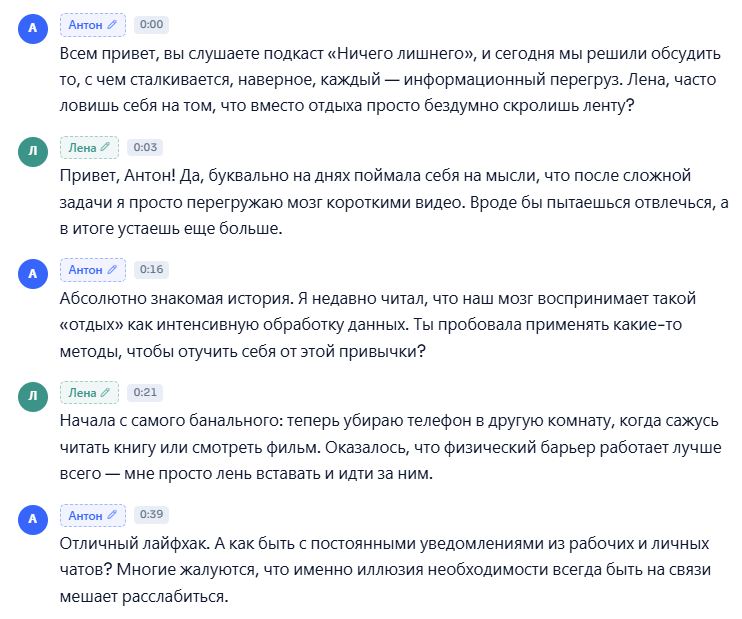
Текст ролика с таймкодами и конспектом
Каждая фраза привязана к моменту видео — клик по строке переносит к нужному месту. Если в ролике несколько голосов, интервьюер и гость размечены отдельно.
- ✓Таймкоды по каждой фразе — быстрый переход к нужному моменту видео
- ✓Метки говорящих — для интервью, подкастов и записей с несколькими спикерами
- ✓Краткое содержание с тезисами и тегами — по кнопке, на Pro
- ✓Экспорт в Word, обычный текст и субтитры SRT
Прежде чем вставить ссылку
Мифы о расшифровке YouTube
Автосубтитры YouTube решают не всю задачу — вот в чём разница.
МифУ YouTube уже есть автосубтитры — зачем что-то ещё?
На делеАвтосубтитры YouTube почти без пунктуации, путают термины и не разделяют говорящих — годятся для беглого просмотра, но не для статьи, конспекта или точной цитаты.
МифЧтобы получить текст, ролик нужно сначала скачать
На делеBloknot принимает прямую ссылку на youtube.com или youtu.be и скачивает звуковую дорожку сам — локальный файл не нужен.
МифРасшифровка часового видео займёт часы
На делеВ среднем обработка занимает около 90 секунд на час записи — конспект часовой лекции готов за пару минут.
МифПрямую трансляцию можно расшифровать в реальном времени
На делеТекст готовится после того, как эфир закончится и станет обычной записью на канале — расшифровки во время самой трансляции сервис не делает.
Нужен сам видеофайл, а не текст?
Bloknot скачивает видео с YouTube отдельным инструментом
Для монтажа или архива иногда нужен сам ролик, а не расшифровка — бесплатный загрузчик сохраняет видео в исходном качестве.
Открыть загрузчик YouTube →Тарифы
Free
0 ₽ навсегда
Без карты · без истечения пробного периода
Для знакомства, разовых задач и коротких клипов.
- ✓90 минут расшифровки в месяц
- ✓ИИ-ассистент на встречу — минуты из месячного лимита
- ✓Файлы до 1 ГБ, длительность не ограничена
- ✓Распознавание речи на 100+ языках
- ✓Разбивка по говорящим
- ✓ИИ-чат по записи — 10 вопросов в месяц
- ✓1 ИИ-отчёт на запись
- ✓API доступен
- ✓Экспорт в любом формате: DOCX, PDF, TXT, MD, SRT, VTT, JSON
- ✓Аудио удаляется после расшифровки, текст остаётся навсегда
Нужно подтвердить email
Популярный
Pro
790 ₽ / месяц
Оплата 9 490 ₽/год · экономия 20%
Для интервью, подкастов и регулярной длинной работы.
- ✓600 минут расшифровки в месяц
- ✓ИИ-ассистент на онлайн-встречи: Телемост, СберДжаз, Zoom и другие
- ✓Файлы до 2 ГБ
- ✓Диаризация — кто что сказал
- ✓ИИ-чат по записи — 100 вопросов в месяц
- ✓Почти 20 типов ИИ-отчётов — до 2 на запись
- ✓Перевод расшифровки на 100+ языков
- ✓API и webhook при готовности
- ✓Храним исходники, пока действует подписка
- ✓Работа в команде: дополнительные места по 690 ₽/мес
Отмена в любой момент
Максимум
Team
2 390 ₽ / месяц
Оплата 28 690 ₽/год · экономия 20%
Для отделов и компаний: минуты общие на всю команду.
- ✓2 500 минут — общий пул команды
- ✓Файлы до 5 ГБ
- ✓Всё из Pro
- ✓ИИ-чат без ограничений
- ✓До 3 ИИ-отчётов на каждую запись
- ✓Рабочие пространства и отделы
- ✓Докупка минут пакетами
- ✓Дополнительные места — 990 ₽ за участника
- ✓Приоритетная поддержка
Большая команда? Напишите нам
Оплата картой РФ · Ежегодно — выгоднее на 20% · Для Free карта не нужна
Частые вопросы
Можно вставить ссылку на любой YouTube-ролик?+
Да, если видео доступно публично или по прямой ссылке. Приватные ролики и видео с ограниченным доступом Bloknot скачать не может.
А если ролик длинный — двух-трёхчасовая лекция или подкаст?+
Лимит длины файла — без лимита часов на тарифах Pro и Team, этого хватает на самые длинные записи. На бесплатном тарифе действует квота 90 минут в месяц.
Чем расшифровка отличается от автосубтитров YouTube?+
Автосубтитры YouTube — черновой поток слов почти без пунктуации и без разделения по говорящим. Bloknot расставляет знаки препинания, метки говорящих и таймкоды по фразам — текст можно сразу использовать в статье.
Можно получить именно конспект, а не полный текст?+
Да, на тарифе Pro доступно краткое содержание по кнопке: главные тезисы, задачи и теги — отдельно от полного текста. Запускается вручную для конкретного видео.
Субтитры, которые выгружает Bloknot, подойдут для загрузки обратно на YouTube?+
Да, экспорт в SRT — стандартный формат, который принимает YouTube Studio как собственные субтитры ролика.
А если видео на английском или другом языке?+
Распознаётся 100+ языков — можно расшифровать оригинальную дорожку на языке видео. Платно доступен перевод текста на 13 языков.
Что с приватностью — ролик ведь публичный, но текст светить не хочется?+
Аудиодорожка удаляется автоматически после обработки; текст расшифровки остаётся в вашем личном кабинете. Сервис не обучается на пользовательских данных.
Работает ли для трансляций и записей эфиров?+
Да, если трансляция уже закончилась и доступна как обычная запись на канале. Расшифровку во время самого прямого эфира сервис не делает.
Следующее видео
Следующий ролик расшифруется так же быстро
Таймкоды, метки говорящих и конспект по кнопке — без скачивания файла на компьютер.