Расшифровка видео в текст
Загрузите видеофайл или вставьте ссылку на YouTube, TikTok или Instagram — Bloknot сам извлечёт звук, распознает речь и отдаст текст с таймкодами или готовые субтитры SRT и VTT.
Как Bloknot извлекает текст из видео
Видеодорожка в распознавании не участвует — важен только звук, и сервис достаёт его сам.
Субтитры и текст с таймкодами по каждой фразе
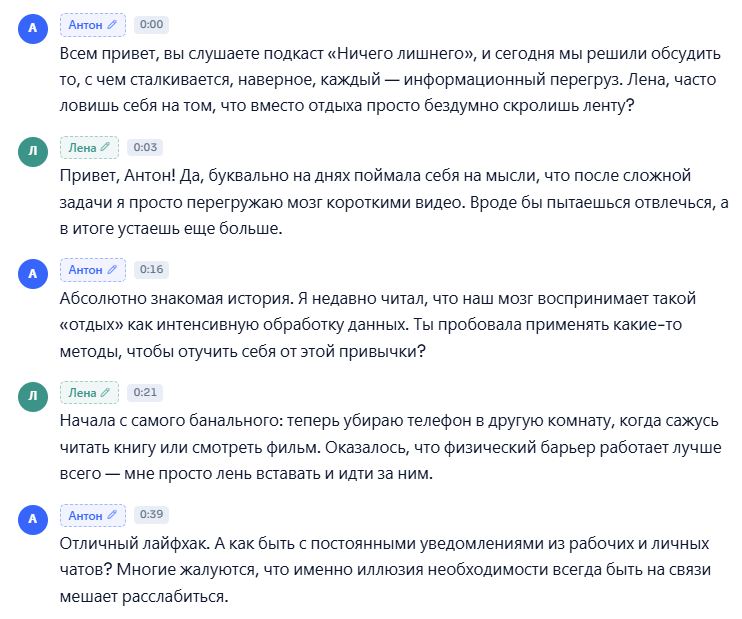
Расшифровка разбита на фразы: у каждой — таймкод и метка говорящего. Клик по строке переносит к нужному месту ролика, так что сверять текст с видео можно, не пересматривая его целиком.
- ✓Субтитры SRT для видеоредактора и VTT для веб-плеера
- ✓Таймкоды по каждой фразе — синхронизировать вручную не нужно
- ✓Метки говорящих, даже когда человека не видно в кадре
- ✓Текстовая версия ролика — основа для статьи или поста
Что можно скачать после расшифровки ролика
Загрузили запись вебинара. Забрали субтитры в двух форматах, текст с таймкодами и документ Word.
Субтитры для монтажки
Субтитры для сайта
С таймкодами
Документ Word
Ещё три формата: PDF, Markdown и JSON — если текст нужен для печати, базы знаний или своей системы. Все семь доступны и на бесплатном тарифе.

Текст из видео: четыре типичные задачи
Одни делают из ролика субтитры, другие — статью, третьи ищут нужный дубль. Обработка одна и та же.
Блогерам — субтитры для вертикальных роликов
Reels, Shorts и VK Клипы часто смотрят без звука. Субтитры из готовой расшифровки возвращают зрителя: ролик понятен даже с выключенным динамиком.

Монтажёрам — найти дубль по слову, а не по таймлайну
Расшифровка исходников превращает поиск реплики в поиск по тексту: нашлось слово — таймкод привёл к дублю. Пересматривать часы черновиков не нужно.
Контент-командам — статья из вебинара или ролика
Записанный вебинар или выпуск на YouTube превращается в текст, из которого собирается статья, рассылка или пост — без переслушивания записи.
Редакциям — точные цитаты из видеоинтервью
Из записи интервью или пресс-конференции достаются дословные цитаты с таймкодами. Кто и что сказал — проверяется кликом по строке, а не пересмотром.
Bloknot умеет записывать и созвоны
Ассистент сам приходит на созвон по ссылке — в Телемосте, СберДжазе, Контур.Толке, МТС Линк, Zoom, Google Meet и Teams, — записывает разговор и присылает стенограмму с кратким содержанием и списком задач.
Страница про созвоны →
- ✓90 минут расшифровки в месяц
- ✓ИИ-ассистент на встречу — минуты из месячного лимита
- ✓Файлы до 1 ГБ, длительность не ограничена
- ✓Распознавание речи на 100+ языках
- ✓Разбивка по говорящим
- ✓ИИ-чат по записи — 10 вопросов в месяц
- ✓1 ИИ-отчёт на запись
- ✓API доступен
- ✓Экспорт в любом формате: DOCX, PDF, TXT, MD, SRT, VTT, JSON
- ✓Аудио удаляется после расшифровки, текст остаётся навсегда
- ✓600 минут расшифровки в месяц
- ✓ИИ-ассистент на онлайн-встречи: Телемост, СберДжаз, Zoom и другие
- ✓Файлы до 2 ГБ
- ✓Диаризация — кто что сказал
- ✓ИИ-чат по записи — 100 вопросов в месяц
- ✓Почти 20 типов ИИ-отчётов — до 2 на запись
- ✓Перевод расшифровки на 100+ языков
- ✓API и webhook при готовности
- ✓Храним исходники, пока действует подписка
- ✓Работа в команде: дополнительные места по 690 ₽/мес
- ✓2 500 минут — общий пул команды
- ✓Файлы до 5 ГБ
- ✓Всё из Pro
- ✓ИИ-чат без ограничений
- ✓До 3 ИИ-отчётов на каждую запись
- ✓Рабочие пространства и отделы
- ✓Докупка минут пакетами
- ✓Дополнительные места — 990 ₽ за участника
- ✓Приоритетная поддержка
Оплата картой РФ · Ежегодно — выгоднее на 20% · Для Free карта не нужна
Какие форматы видео принимает сервис?+
С каких площадок можно вставить ссылку?+
Можно ли извлечь текст из видео бесплатно?+
«Перевести видео в текст» — это перевод на другой язык?+
Как получить реплики одного говорящего?+
В чём разница между SRT и VTT?+
Субтитры сразу готовы к загрузке на YouTube?+
Таймкоды в тексте сохраняются?+
Нужно ли регистрироваться?+
Что происходит с видео после обработки?+
А если это прямая трансляция или созвон, который идёт сейчас?+
Загрузите видео — текст будет готов за минуты
Звук извлекается сам, таймкоды расставляются автоматически. Останется скачать SRT, VTT или Word.